Run Secure, Scalable Cloud Desktops for Your Workforce Nationwide
Replace physical desktop headaches with a fully managed cloud workstation platform powered by Azure Virtual Desktop. Improve onboarding speed, strengthen security, and support remote, hybrid, and multi-location teams with predictable per-user pricing.
- Faster onboarding and offboarding with centralized access controls
- Compliance-friendly security posture with MFA and conditional access
- Cost control through pooled desktops and autoscaling

Why Physical Desktop Management Breaks Down for Remote Teams
Even low-cost hardware becomes expensive when you factor in shipping, recovery, device loss, inconsistent patching, and security gaps. These challenges multiply with distributed teams and high turnover.
Logistics and downtime
Shipping, recovery, and replacements slow onboarding and create productivity gaps when devices fail or go missing.
Security inconsistency
Remote endpoints drift out of compliance when users are offline, defer updates, or store data locally.
Hidden operational costs
Spare inventory, asset tracking, and hardware loss exposure raise the true cost of ownership over time.

The Better Model: Secure Managed Cloud Workstations
With Azure Virtual Desktop, your team connects to a consistent Windows desktop experience hosted in Microsoft Azure. Access is controlled centrally, security policies are enforced consistently, and support is streamlined.
Benefit: Faster onboarding
Get new users productive quickly without waiting for hardware shipping or imaging.
Supported by standardized desktop images, pooled desktops, and automated access provisioning.
Benefit: Stronger compliance posture
Centralize controls to reduce local data exposure and simplify security governance across remote teams.
Supported by MFA, conditional access, centralized logging, patch management, and policy enforcement.
Benefit: Business continuity
If a device fails, users log in from another device and continue working with minimal disruption.
Supported by cloud-hosted desktops, centralized profiles, and managed session hosts.
Benefit: Cost control at scale
Align compute usage to real demand with pooled desktops and autoscaling.
Supported by scheduled autoscaling, capacity guardrails, and standardized sizing.
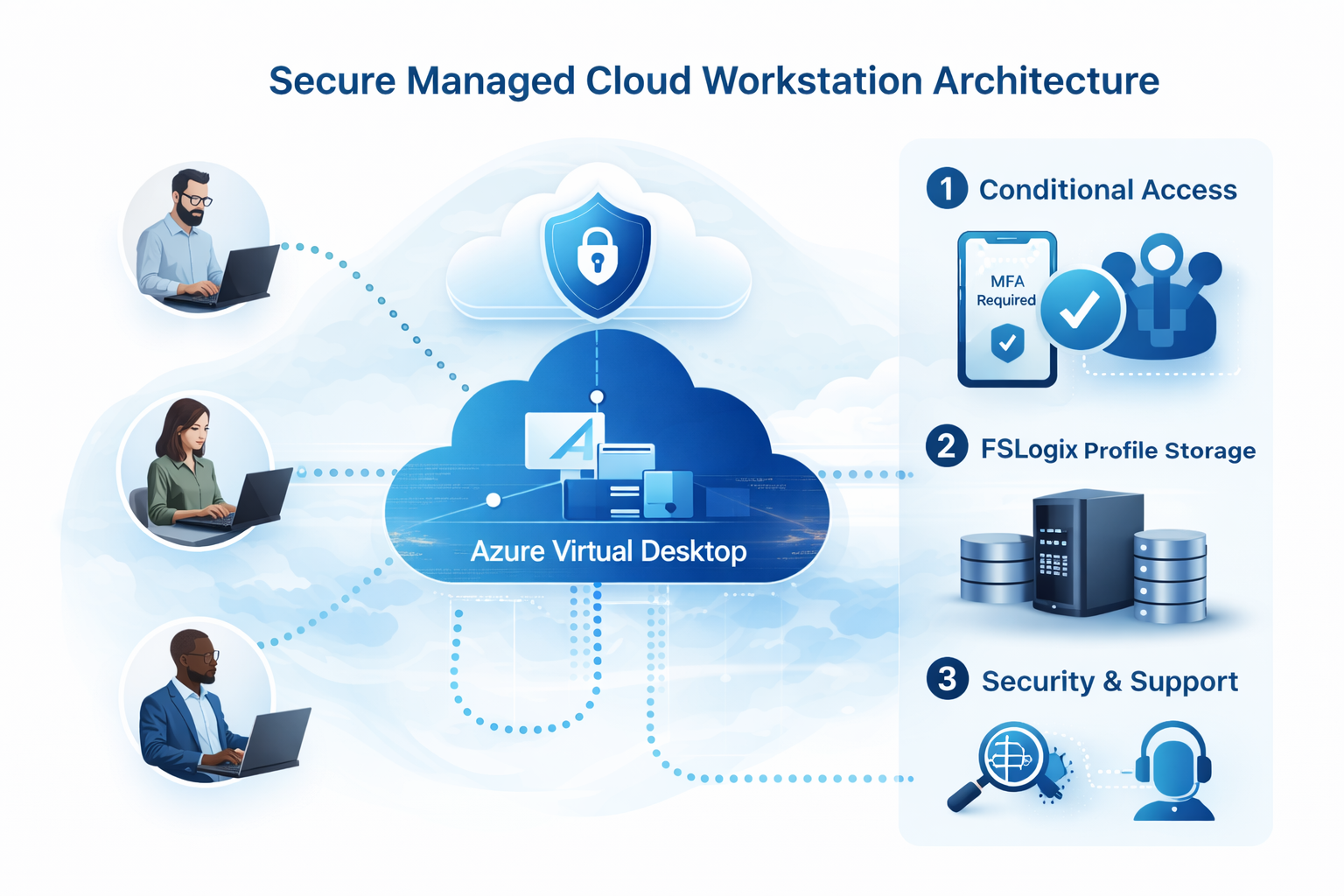
What’s Included in the Per-User Monthly Bundle
One predictable per-user price that bundles the platform and managed services needed to support a secure workforce.
Optional add-ons: thin clients, managed endpoints, extended hours support, application packaging, advanced compliance reporting.
Built for Nationwide Teams and Multi-Location Organizations
Whether your staff is remote, hybrid, or spread across multiple locations, this model standardizes security and user experience across the organization.
Common use cases
- Remote-first companies
- Hybrid offices
- Professional services firms
- Healthcare administrative teams
- Accounting, finance, and insurance
- Dispatch and support operations
- High-turnover environments
Why it works nationwide
- Centralized access policies and identity security
- Consistent desktop images and patching standards
- Reduced local data exposure on endpoints
- Scalable capacity for growth and seasonality
- Predictable per-user monthly cost model

How It Works
A clear process that keeps deployments predictable and keeps operations stable.
1. Assess
We confirm user count, application needs, security requirements, and peak usage patterns.
2. Deploy
We build the cloud workstation environment, security policies, profiles, and access groups.
3. Manage
Ongoing patching, monitoring, antivirus, and help desk support under a per-user monthly plan.
Get a Free Fit Check and Sizing Estimate
Tell us a few details and we will confirm whether cloud workstations are a good match and provide a per-user proposal.
What we need
- Number of users
- Primary applications
- Remote or hybrid
- Compliance requirements, if any
Prefer a quick call instead of a form? Use the button below.
Request pricing
Replace this block with your WordPress form shortcode. Example: or your PageLayer form widget.
Fields recommended: Name, Email, Company, Users, Notes
Response time goal: same business day.
Frequently Asked Questions
Can employees use their own computers?
Yes. Users can connect from personal computers or company devices. Security policies can be adjusted based on your compliance requirements and risk tolerance.
How long does it take to deploy?
Most deployments start with a short assessment and a pilot group. Timing depends on application requirements and any compliance needs, but the process is designed to be predictable and repeatable.
Is this more secure than traditional desktops?
In many environments, yes. Centralized access controls, MFA, conditional access, standardized patching, and reduced local data exposure typically improve security posture, especially for remote teams.
What does pricing start at?
Secure Managed Cloud Workstations start at $139 per user per month. Final pricing depends on user count, applications, storage requirements, and support coverage.